Understanding Embeddings in VIDIZMO
Embeddings in VIDIZMO are numerical vector representations of content that capture semantic meaning. Similar content is placed close together in vector space, enabling semantic search to find related items without relying on exact keyword matches.
Embeddings provide a structured way to represent text, transcripts, metadata, and document content, making content in VIDIZMO portal ready for search and retrieval.
What Are Embeddings
In VIDIZMO, an embedding is a numerical vector that represents the semantic meaning of content, primarily derived from text sources such as video descriptions, transcripts, captions, and document text. Unlike standard keyword indexing, embeddings capture the context and meaning of content, allowing semantic understanding beyond exact words.
Content that is similar in meaning, like two videos explaining company data retention policies, will have embeddings that are positioned closer together in vector space. This enables VIDIZMO to:
-
Find related content without requiring exact keyword matches.
-
Support semantic search, so queries like “data storage guidelines” return relevant videos, documents, or transcripts.
-
Power AI chatbot with context-aware responses by retrieving semantically relevant content.
Example in VIDIZMO
-
Video A: “Company Data Retention Policy” → Embedding [0.8, 0.3, 0.5…]
-
Video B: “How We Store Client Information” → Embedding [0.7, 0.4, 0.5…]
-
Video C: “Office Birthday Party 2024” → Embedding [-0.2, 0.9, -0.4…]
A semantic search for “data storage guidelines” would find Videos A and B because their embeddings are close in vector space, while Video C would be ignored as it’s semantically unrelated.
What Content Does VIDIZMO Embed?
VIDIZMO generates embeddings only for text-rich content that conveys semantic meaning. Metadata such as titles, tags, and custom attributes are not embedded; they remain searchable via traditional keyword search.
| Content Type | Embedding Behavior |
|---|---|
| Video/Audio | Embeddings generated from descriptions, transcripts, captions. |
| Documents | Embeddings generated from extracted text, split into chunks. |
| Images | Embeddings generated from OCR-extracted text or directly from images using multimodal embedding models. |
| Metadata | Tags, and custom attributes are keyword-indexed only, no embeddings generated. |
Note: VIDIZMO primarily embeds textual content. Audio is transcribed before embedding. Images can be processed via OCR to extract text, or embedded directly using multimodal embedding models that support image inputs.
The Embedding App
The Embedding App in VIDIZMO manages embedding generation and vector search operations, enabling semantic search.
Purpose
- Generates embeddings for newly uploaded content.
- Supports semantic search and AI-assisted content discovery.
Prerequisites
- Agentic AI feature permission must be enabled in the portal.
Enabling the Embedding App
- Navigate to Portal Settings → Apps → Content Processing → Embedding App.
- Configure workflow templates
- Enable or disable the app per portal.
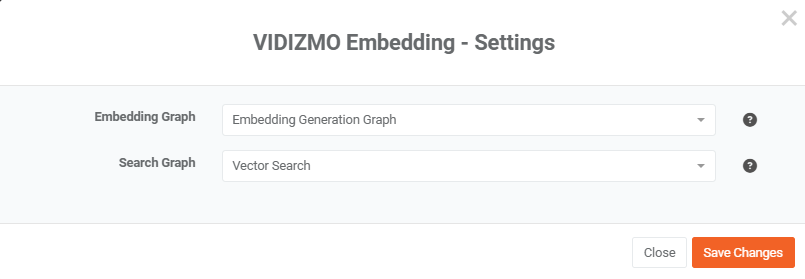
Configuring Embedding Workflows
The Embedding App uses two workflow graphs to handle content and queries:
| Graph | Purpose | When It Runs |
|---|---|---|
| Content Embeddings Graph | Converts uploaded content into vector embeddings | During content upload |
| Search Graph | Converts user queries into embeddings for similarity search | During search or chatbot queries |
- Content Embeddings Graph: Select the workflow template that generates embeddings from content such as video descriptions, transcripts, captions, and document text.
- Search Graph: Select the workflow template used by the Search Mashup node to perform vector-based search and RAG operations.
Pre-built workflow templates are available and can be customized in the Workflow Designer to fit specific requirements.
Note: Embeddings are generated only for content uploaded after the app is enabled. Metadata fields such as tags, and custom attributes remain keyword-indexed and are not embedded.
VIDIZMO Embedding Flow
VIDIZMO generates embeddings by first preparing content and then processing it through parallel workflow paths. The resulting embeddings power semantic search, AI-driven content analysis, and retrieval-augmented generation (RAG) pipelines.
Pre-Embedding Data Preparation
Before embeddings are generated, VIDIZMO prepares content to ensure it is clean, structured, and semantically meaningful:
- Fetch Timed Data: Extracts time-coded transcripts, captions, video descriptions, and chapters from audio and video content.
- Fetch Document Text: Extracts text from uploaded documents and OCR outputs.
- Create Text Chunks: Splits large text into manageable segments while preserving semantic boundaries and contextual continuity.
This ensures embeddings are created from clean, structured, and meaningful text. VIDIZMO stores embeddings in the vector database, enabling semantic search and AI-assisted content retrieval.
Embedding Workflow Paths
Once content is prepared, VIDIZMO processes it through two parallel workflow paths:
Basic Info Path
- Fetch Metadata: Collects content titles, descriptions, tags, and custom attributes.
- Merge Content: Combines metadata fields into unified text blocks.
- Generate Embeddings: Converts merged metadata into vector representations.
- Store Embeddings: Saves embeddings in the vector database for future search and analysis.
Note: While metadata is collected and processed, embeddings are primarily generated from descriptive content (e.g., video descriptions), not just titles or tags.
Timed Data Path
- Fetch Timed Data: Retrieves transcripts, captions, and video descriptions.
- Chunk Content: Splits timed data into semantically coherent segments suitable for embedding.
- Generate Embeddings: Converts segments into vectors capturing meaning and context.
- Store Embeddings: Saves embeddings with timestamps in the vector database, enabling precise semantic search and RAG retrieval.
Storage and Usage
All embeddings are stored in Elasticsearch, which acts as both the keyword index and vector database. This unified storage allows VIDIZMO to:
- Perform hybrid search combining keyword and vector similarity.
- Enable semantic search for content discovery.
- Feed embeddings into AI workflows and RAG pipelines.
Types of Embeddings in VIDIZMO
| General Type | VIDIZMO Equivalent |
|---|---|
| Text embeddings | Transcript and OCR-extracted text |
| Document embeddings | Document text (chunked pages or paragraphs) |
| Sentence embeddings | Timed data chunks (captions, subtitles) |
| Metadata embeddings | Video descriptions ( tags, and other metadata are not embedded by default) |
| Image embeddings | Direct image vectors using multimodal models (requires compatible provider) |
Audio embeddings are not directly generated; audio content is transcribed to text before embedding. Image embeddings can be generated directly using multimodal models or via OCR-extracted text.
Multimodal Embedding Support
VIDIZMO's embedding system supports multimodal inputs, allowing both text and images to be converted into vector representations within the same workflow.
Supported Input Types
The Embedding Node in Workflow Designer accepts two input types:
| Input Type | Description | Supported Formats |
|---|---|---|
| Text | Text content such as transcripts, descriptions, document text, or any string input. | Plain text strings |
| Image | Visual content embedded directly without OCR conversion. | Base64-encoded strings, URLs, or local file paths |
How Multimodal Embedding Works
- Input Detection: The embedding node automatically detects whether the input is text or image based on the input type field.
- Parallel Processing: Text and image inputs can be processed in the same workflow, with the system routing each to the appropriate processing path.
- Unified Output: Both text and image embeddings produce vectors in the same dimensional space (when using multimodal-compatible models), enabling cross-modal similarity search.
Use Cases
- Visual Content Search: Find images based on text queries or find similar images.
- Cross-Modal RAG: Retrieve relevant images alongside text documents in chatbot responses.
- Thumbnail Matching: Match video thumbnails with related content.
Note: Direct image embedding requires a multimodal embedding model. Not all providers support image embeddings. Check provider documentation for multimodal capabilities.
Indexing vs Embedding
- Embedding: Converts raw content into vector representations that capture semantic meaning.
- Indexing: Organizes and stores these vectors in a searchable structure to enable efficient retrieval.
In VIDIZMO, the Embedding Graph generates embeddings from content, which are then stored in the vector database. This allows semantic search, AI-assisted content discovery, and RAG-powered retrieval pipelines to function efficiently.
How Semantic Search Uses Embeddings
Semantic search in VIDIZMO allows users to find content based on meaning rather than exact keyword matches. Unlike traditional keyword search, which only retrieves content containing the exact words in a query, semantic search leverages embeddings numerical vector representations of content to understand the underlying context and intent. For example, a query like “data storage guidelines” can return results such as “Data Retention Policy” or “Client Information Storage,” even if the exact words do not appear in the content.
When a user submits a search query, VIDIZMO first converts the query into an embedding using the same model as the content embeddings. It then compares this query vector against the vectors stored in the vector database, identifying content that is semantically similar. This approach allows the system to retrieve relevant content that captures meaning and context, not just literal matches.
Semantic search requires the Embedding App to be enabled. Without embeddings, VIDIZMO falls back to traditional keyword-based search.
Using Embeddings with AI Chatbots (RAG)
VIDIZMO’s RAG agents can deliver context-aware responses using embeddings without requiring the Embedding App.
- Attach Embedding Workflow: Add a pre-built or custom embedding workflow template directly to the agent via the Workflow Designer.
- Query Conversion: When a user submits a query, the agent converts it into an embedding.
- Semantic Search: The embedding is used to retrieve relevant content from the vector database.
- Contextual Response: Retrieved content is passed to the LLM as context.
- Response Generation: The LLM generates a response grounded in source content, optionally including citations.
Note: The embedding workflow template must be configured in the agent to enable RAG functionality. Embedding nodes are reusable within Workflow Designer and can be customized for different content types or portals.
Supported Embedding Providers
| Provider | Type | Dimensions |
|---|---|---|
| OpenAI | Cloud | 1536–3072 |
| Azure OpenAI | Cloud | 1536–3072 |
| Cloud | 768 | |
| HuggingFace | Local/Cloud | 384–1024 |
| Ollama | Self-hosted | 768–1024 |
| Infinity | Self-hosted | Model-dependent |
| VLLM | Self-hosted | Model-dependent |
Embedding dimensions determine the granularity of semantic representation. Different providers may balance accuracy and computation differently.
Online and Offline Embeddings
In VIDIZMO, embeddings can be generated online using cloud providers (OpenAI, Azure OpenAI, Google, HuggingFace) or offline for on-premise deployments using self-hosted options (Ollama, Infinity, VLLM).
Online embeddings enable workflow designers to create vectors for semantic search, similarity matching, and RAG pipelines directly from the workflows.
Offline embeddings are supported for on-premise VIDIZMO deployments, allowing organizations to generate embeddings locally without sending data to external providers. Both approaches convert textual content single strings or batches of strings into numerical vectors, enabling VIDIZMO to deliver context-aware AI-powered search and retrieval, whether the system is deployed in the cloud or on-premises.
Vector Search in VIDIZMO
Vector search in VIDIZMO enables semantic search by meaning, allowing users to find content that is conceptually related rather than relying on exact keywords. This process is powered by two workflow graphs within the Embedding App. The Embedding Graph generates vector embeddings from content during upload, capturing its semantic features.
The Search Graph converts user queries into vectors and finds content with the closest semantic similarity in the vector database. For accurate results, both graphs must use the same embedding model, ensuring that query vectors and content vectors are compatible.
Within workflows, the Search Mashup Node can accept a vector parameter consisting of a name and a vector (an array of floats) to perform similarity based retrieval. This enables VIDIZMO to locate content that matches the intent and meaning of a query, even when the exact keywords are not present in the content.